
As a follow up to my previous post, there are occasions when you will need to know which keys are currently in use in your environment. For example, how do you know which keys is required to encrypt your VM, which KMS Cluster provided the key and which hosts have that key in their keyCache?
Well, the following script aims to provide you with all that information.
Before running this script, you will need to edit the lines in the first section called ‘User Variables’:
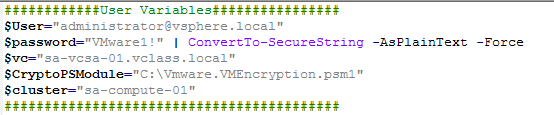
Simply replace the values you see with the values for your own vCenter, username, password and Cluster. The script will then provide a summary of the following three categories:
- All keys known to vCenter. When an encrypted VM is created or registered, vCenter makes a note of the required encryption key to manage the VM and its disks. If a VM is not properly registered, or was registered by someone without Cryptographic privileges, vCenter will not note the required Key identifier. If vCenter doesn’t know about the key, it will never be requested from the key server, thus rendering the VM unusable.
- All keys in the key cache of each host in the specified cluster. There may be occasions when a required key cannot be pushed to a host by vCenter. If the host does not get a copy of the key, it cannot manage the encrypted entity. For example, if a host reboots while connectivity to the KMS is down for whatever reason, vCenter will not be able to retrieve the keys on behalf of the host. This will result in the host being unable to enter Crypto-safe state and no encrypted VMs will be manageable on this host. Or, if a required key has been digitally shredded or removed from the KMS, it cannot be provided to the host. Use this vale to ensure that the key required to manage your VM is in the possession of the host. If not, look for another host that may still have a copy of the VM and register the VM directly on that host via the Host Client. If you unregister the VM from vCenter first, every host will be told to discard their copy of the key and your VM will be toast! If you leave the VM registered in vCenter, but go directly to the host with a copy of the required and register the VMX there, it will simply appear to vCenter that the VM has changed location, rather than being unregistered. This will make your VM manageable again and you should proceed to rekey it as soon as possible. Otherwise, if the other hosts lose their copy of the shredded key too, you will no longer be able to manage your VM. (There is no secret backdoor that VMware can provide for you, by the way. If you lose your key, you lose access to the VM data)
- A list of all encrypted VMs and the keys required to manage them.
Here is a sample output:

Sorry, I could not figure out a way to get the Host Key Cache Summary to show in a table form like with the other outputs (I could only get it to show one value per host). If anyone has suggestions for improving this, I would be happy to hear from you.


 theVirtualPaddy
Leave a reply to AP Cancel reply