Why am I talking about Beacon Probing?
Simply because, in my experience, it is a very misunderstood feature in vSphere and I hope to clear up some of the confusion around its implementation and behaviour.
What is Beacon Probing?
With virtual switches, multiple connections (uplinks) to the physical network switches can be configured to allow for redundancy and load-balancing. Best practice dictates that these uplinks should be connected to different physical switches to guarantee proper redundancy. Take the following as an example:

This is a typical networking configuration for simple redundancy. The ESXi is perfectly capable of detecting issues with the connections between the hosts and the Edge Switches by relying on Link State tracking. So, should one of the switches go down, the cable be unplugged, or the physical port be disabled, ESXi will notice and disable the associated network uplink port on the vSwitch, resulting in all traffic being redirected to the remaining good port. No problems there!
However, the ESXi will not be able to detect configuration issues, such as VLAN mismatches, or downstream issues, such as problems with the connection between Edge and Core switches. Now Cisco switches in particular have a feature called Link State Tracking that will ensure that links that depend on another (i.e. links between switches) will all be disabled if one them becomes unavailable. Check out the Cisco documentation page for details on this (http://www.cisco.com/c/en/us/td/docs/switches/datacenter/nexus4000/nexus4000_i/sw/configuration/guide/rel_4_1_2_E1_1/n400xi_config/link_state_track.html).
According to VMware’s documentation, Link State Tracking is the preferred method for detecting downstream network issues and should be used wherever possible (http://kb.vmware.com/kb/1005577):
When should you enable beacon probing?
You must enable beacon probing when downstream link failures may impact availability and there is no Link State Tracking on the physical switch.
So, let’s assume in our environment above, we do not have Link State Tracking functionality. What would happen if the link between Edge Switch 2 and the Core Switch fails?
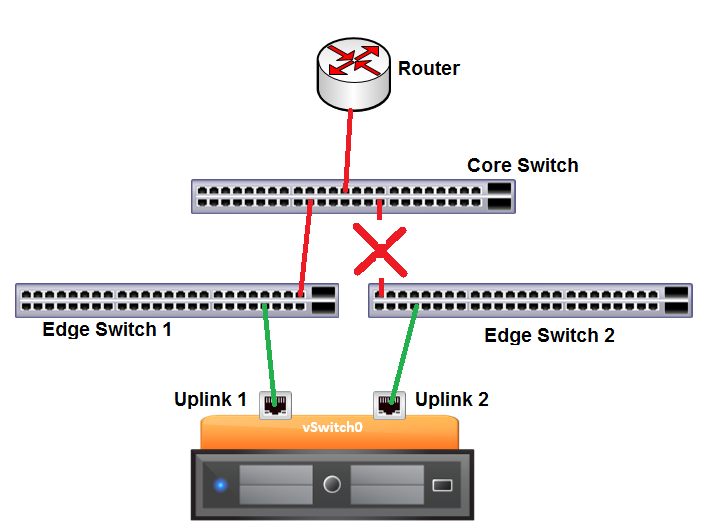
ESXi will not detect any issues because the link to Edge Switch 2 from the vSwitch is alive and well. However, any VMs assigned to that uplink will no longer be able to reach the Router. So, ideally, we would want all our VMs traffic to fail over to Uplink 1. This will not happen automatically unless we can find some way to determine that Uplink 2 is now bad. This is where Beacon Probing comes in.
How does Beacon Probing work?
Again, quoting from the VMware KB mentioned above:
ESXi/ESX periodically broadcasts beacon packets from all uplinks in a team. The physical switch is expected to forward all packets to other ports on the same broadcast domain. Therefore, a team member is expected to see beacon packets from other team members. If an uplink fails to receive three consecutive beacon packets, it is marked as bad. The failure can be due to the immediate link or a downstream link.
What does this mean and how does it work in reality. To get a good idea of the functionality that is being employed here, I recommend you visit an excellent post by Thomas Low (http://thomaslowblog.blogspot.com/2011/10/vswitch-network-failover-detection.html). Thomas does a great job of showing how to capture the packets for analysis and how the communication is taking place between the ESXi hosts.
Suffice to say, ESXi sends beacon packets from each physical uplink on the vSwitch to all other uplinks on the same vSwitch. So each uplink is sending communication to all other uplinks and is expecting to receive communication from all other uplinks. When 3 beacon packets have been missed from one of the uplinks, it is marked as bad.
In our example above, this means that Uplink 1 will no longer be receiving communication from Uplink 2 and vice versa, as the only route between them goes via the Core Switch. But as neither uplink is receiving packets, which one do we disable? If we disable Uplink 1, then all VMs will lose access to the Router. But we haven’t got enough information to determine which link would be best to disable. Not good!!!
In this scenario, rather than disabling one of the Uplinks, ESXi will actually forward all packets out both interfaces in what is known as ‘shotgun mode’. This will ensure that all VM traffic has the best possible chance to get where it should go. This will work fine as long as Edge Switch 2 is truly isolated, but may cause errors on the network if there are other switches interconnected as multiple copies of the same packets will be transmitted.
This explains the following statement from VMware’s KB:
Beaconing is most useful with three or more uplinks in a team because ESXi/ESX can detect failures of a single uplink. When there are only two NICs in service and one of them loses connectivity, it is unclear which NIC needs to be taken out of service because both do not receive beacons and as a result all packets sent to both uplinks. Using at least three NICs in such a team allows for n-2 failures where n is the number of NICs in the team before reaching an ambiguous situation. These uplink NICs should be in an active/active or active/standby configuration because the NICs in an Unused state do not participate in the beacon probing process.
Let’s look at what would happen if we follow VMware’s recommendation of having 3 uplinks.
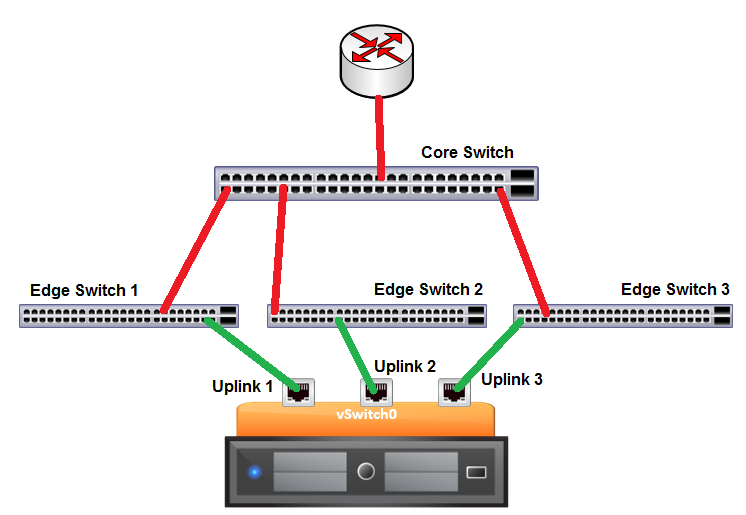
The diagram above reflects what VMware means when they say using at least 3 NICs in a team is preferred and I will explain later in the post how this has been often misunderstood by customers and even some engineers in VMware. Firstly, let’s look at how things should work when things are configured according to the designed functionality of Beacon Probing.
Let’s break one of the links between the Edge Switches and the Core Switch.
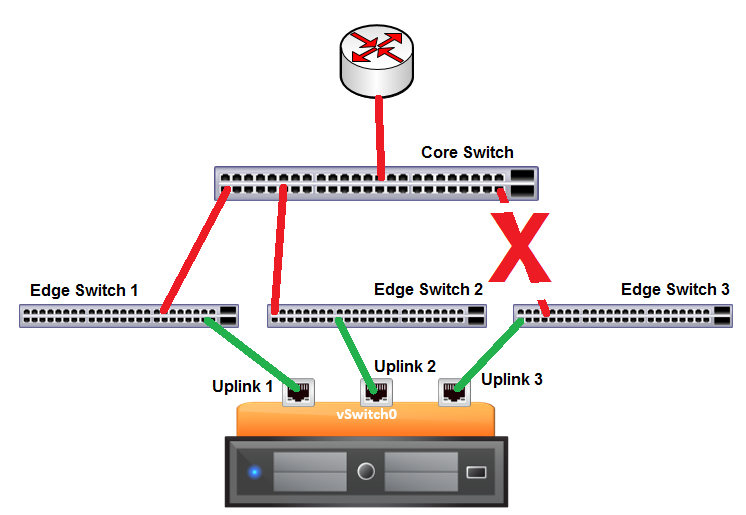
Now Uplinks 1 and 2 will be receiving the beacons from each other but nothing from Uplink 3. Uplink3 will also notice that he is not receiving any communications from the other uplinks leading to the conclusion that he is the one with the issue. Great! Now we can make a sensible decision and the ESXi will disable Uplink 3, so VMs and vmkernel ports attached to the vSwitch will no longer use this link to access the physical network.
It all seems so simple, so where does it all go wrong?
It seems that the bulk of the problems arise around a misunderstanding about which uplinks will be disabled by Beacon Probing in various scenarios and why just having 3 uplinks does not always mean that everything will work as expected. Let’s look at a few scenarios where misunderstandings actually lead to Beacon Probing to cause more problems than it fixes.
Let’s first take the scenario where the administrator reads the VMware KB and decides he should follow the documentation and assign 3 uplinks to his vSwitch. However, he only has 2 physical switches to which he can connect his uplinks.
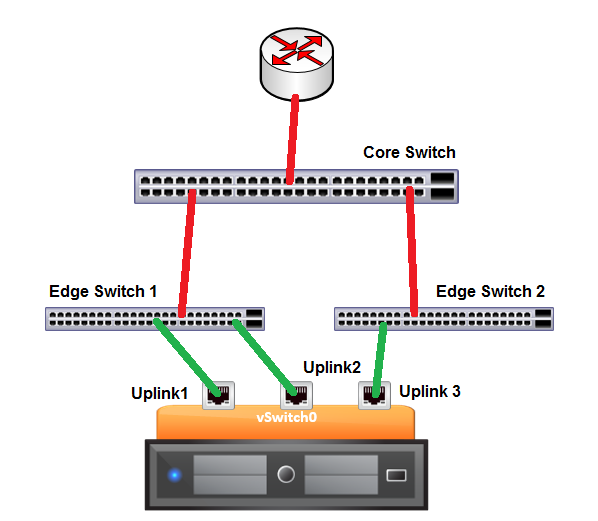
This in not an untypical scenario where someone reads the documentation and believes he is following the recommended practices. I’m going to throw a spanner in the works, however, and show you why this scenario is even worse than having only two uplinks.
Let’s break the link between Edge Switch 1 and the Core Switch:
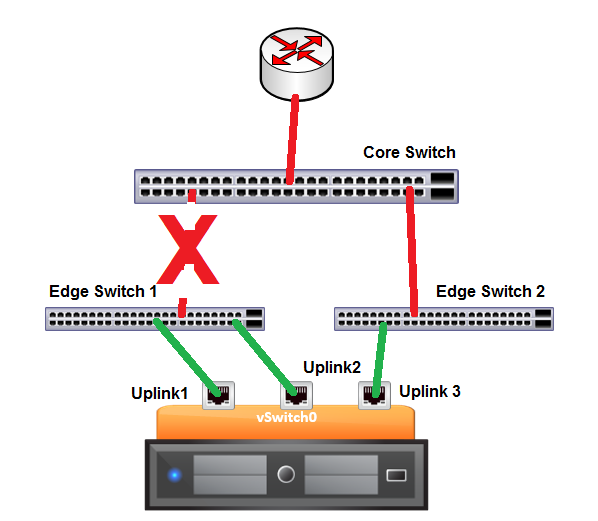
Now, thinking about the behaviour of Beacon Probing, which of the uplinks is going to be disabled? Well, Uplink 1 and Uplink 2 will both be able to communicate to one another but not to Uplink 3. Also, Uplink 3 will cease receiving packets from both the other Uplinks. In this case, the decision made by ESXi will be, again, to disable Uplink 3. However, by disabling Uplink 3, we will actually be denying all VMs access to the router. So, in fact, we have made the situation worse than if we had no Beacon Probing enabled.
Here is another common misconfiguration when using Beacon Probing:
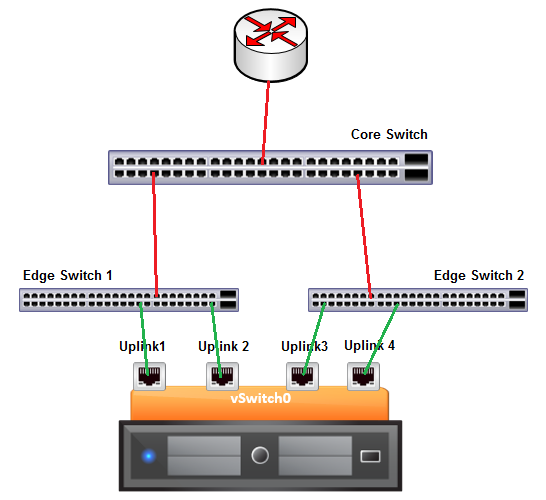
This time the administrator is really going for all the redundancy he can get. But, again, this configuration is potentially going to cause major issues in the case of one of the links going down between the Edge Switches and the Core Switch.
Once again, assume one of the links goes down as follows:
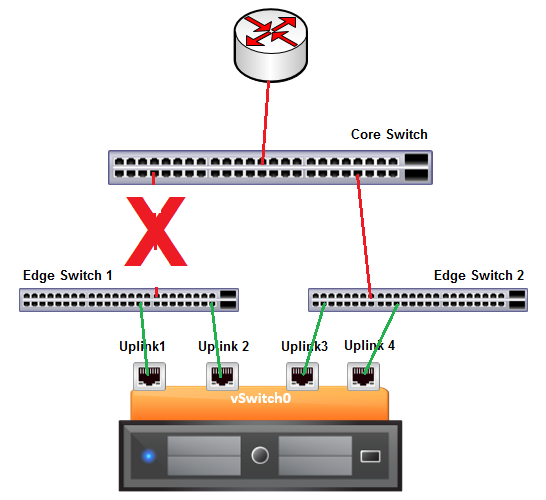
In this scenario, Uplinks 1 and 2 will be receiving beacons from each other and Uplinks 3 and 4 will similarly be receiving beacons from each other. No single uplink looks to be in a bad state, but clearly there is a problem, as Uplinks 1 and 2 will not be hearing from 3 and 4 and vice versa. In this scenario, we do not invoke the shotgun mode because we can determine that all uplinks still have connectivity to at least one other uplink and this would lead to duplicate packets within the physical switches. However, we also know that something is wrong, so ESXi will proceed to disable one of the pairs of uplinks. But which one? Unfortunately, this is a game of Russian Roulette one of the pairs will be randomly chosen. If Uplinks 3 and 4 are disabled here, we are back to a situation where no VMs have access to the router and our situation is worse than where we started.
Conclusion
Given the behaviour of Beacon Probing, we can see why VMware recommend using Link State Tracking on the physical switches wherever possible, and I would echo that recommendation.
If you do have to use Beacon Probing, make sure you understand the impact it is going to have on your network design and that you take appropriate precautions to avoid scenarios like those presented. Obviously, there are many other possible scenarios and network topologies that we could analyse. Hopefully this information will help you to predict the outcomes of failures you might encounter by applying the same logic.


Leave a comment